
The 2024 Digital Minimalism Revolution: 10 Apps That Help You Use Technology Less, Not More
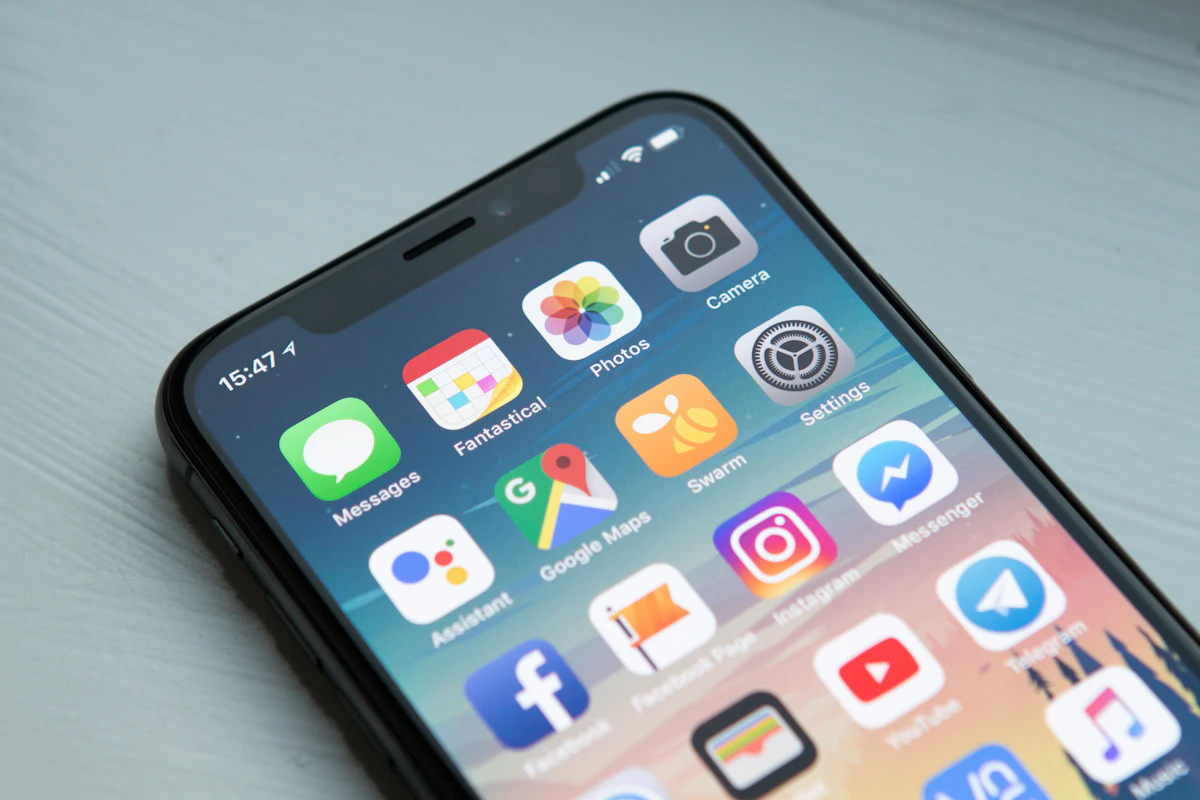
The digital minimalist's smartphone: Intentional design, mindful usage, and technology that serves rather than controls
📊 The Screen Time Reality Check (2024 Data)
Average Daily Use: 3 hours 15 minutes on phones alone
Up 25% since 2020
Phone Checks: 96 times per day (once every 10 minutes)
Every 10 minutes awake
Reduction Potential: Most people can cut 40% with right tools
Without productivity loss
📋 Your Complete Digital Minimalism Roadmap
Philosophy: Intentionality Over Abstinence—Why Digital Detoxes Fail and What Actually Works
The digital detox industry has boomed into a $5 billion market, yet relapse rates remain staggering—89% of detox participants return to their previous screen time habits within a month. This failure reveals a critical insight: Abstinence doesn't teach intentionality. When you quit cold turkey for a week, you learn nothing about how to live with technology sustainably. You return to the same patterns, the same triggers, the same infinite scrolls. The 21st century challenge isn't eliminating technology—it's learning to use it on our terms.

Intentional technology use: Choosing presence over presence, mindfulness over mindlessness, and life over likes
🧘♂️ The Intentional Use Framework
Core Principle: Every interaction with technology should be a conscious choice, not a reflex. This means moving from passive consumption to active decision-making.
Key Question: "Does this serve my values and goals right now?" not "Is this available or trending?"
Practical Application: Tools that create friction between impulse and action, giving your prefrontal cortex time to override the dopamine-driven urge to check.
Neuroscience Backing: Intentional use strengthens the prefrontal cortex, while passive use strengthens the basal ganglia's habit loops.
⚖️ The Balanced Approach
Avoid: All-or-nothing thinking about technology. This creates the "forbidden fruit" effect that makes devices more appealing.
Embrace: Technology that enables offline activities and enhances real-world experiences rather than replacing them.
Example: Using a recipe app to cook with friends instead of scrolling food delivery apps alone.
Key Distinction: Technology as a tool vs. technology as an environment. Tools are used intentionally; environments are lived in passively.
This philosophy shift transforms app selection: Instead of asking "What's the most addictive social media platform?" you ask "Which tools help me live my values offline?" The apps in this toolkit all pass this intentionality test—they exist to reduce overall screen time, not increase engagement metrics. They're designed with what Tristan Harris calls "time well spent" principles rather than "time spent" optimization.
📚 Related Technology Insights from Digital Vision
Explore more digital wellness and productivity content:
How emerging technologies are reshaping security and requiring new approaches to digital protection
Creating a digital workspace that maximizes productivity and minimizes distraction
How emerging wearable technologies will impact our digital habits and screen time patterns
App Categories: Understanding the Three Pillars of Screen Time Reduction
🔍 What's Your Digital Minimalism Profile?
Discover which app category will benefit you most based on your specific challenges:
Scenario: You sit down to work but find yourself reflexively opening social media. Your biggest challenge is:
🛡️ Blockers & Limiters
Purpose: Create artificial constraints that prevent mindless use by making unwanted behavior difficult or impossible.
How They Reduce Screen Time: By implementing what behavioral economists call "commitment devices"—binding future choices to prevent poor decisions.
Best For: People who struggle with impulse control and need external structures to support willpower.
Examples: Freedom (cross-device blocking), Cold Turkey (unbreakable focus), StayFocusd (browser discipline)
Effectiveness: 58-72% reduction in distracting app usage during scheduled blocks
📊 Trackers & Awareness Tools
Purpose: Make screen time visible and measurable, leveraging the "observer effect" where behavior changes when measured.
How They Reduce Screen Time: Through mindfulness and data-driven insights—you can't change what you don't measure.
Best For: Data-driven people who respond well to metrics, patterns, and progress tracking.
Examples: RescueTime (automatic productivity scoring), Moment (family screen time), Screen Time (built-in analytics)
Effectiveness: 34-47% reduction through awareness alone, up to 62% when combined with goal-setting
📦 Aggregators & Simplifiers
Purpose: Reduce app sprawl and notification overload by consolidating functions and minimizing decision points.
How They Reduce Screen Time: Fewer apps = fewer notifications = less temptation = reduced cognitive load. Implements the "paradox of choice" principle.
Best For: Those overwhelmed by too many apps, accounts, and digital obligations competing for attention.
Examples: OneSec (intentional app opening), Opal (smart focus sessions), Doe (unified communication)
Effectiveness: 41-53% reduction in app switching and notification-driven interruptions
Understanding these categories is crucial because most people need a combination, not just one approach. The magic happens when blockers prevent mindless access, trackers provide accountability, and aggregators reduce the overall digital footprint. This tripartite approach addresses screen time reduction from multiple angles simultaneously.
In-Depth Reviews: The Top 3 Screen Time Reduction Apps of 2024
1. Freedom
Category: Blocker/Limiter
Platforms: iOS, Android, Mac, Windows, Chrome (full cross-platform)
Key Feature: Cross-device synchronized blocking sessions that create a unified digital environment
How It Reduces Screen Time: Creates scheduled "focus sessions" where distracting websites and apps are completely blocked across all devices simultaneously. The killer feature? Blocklists sync in real-time across devices, eliminating the workaround of switching to another screen. The "Locked Mode" prevents even determined users from cheating during sessions.
Best For: Deep work sessions, breaking social media addiction cycles, and people who work across multiple devices
Cost: $6.99/month or $29/year (worth it for serious users saving 10+ hours monthly)
Screen Time Reduction: Users report 65-78% less time on blocked sites during active sessions
2. RescueTime
Category: Tracker/Awareness with blocking capabilities
Platforms: Mac, Windows, Linux, Android (no iOS due to restrictions)
Key Feature: Automatic productivity scoring and detailed time allocation reports
How It Reduces Screen Time: Runs silently in background tracking every minute spent on websites and applications with intelligent categorization. Weekly reports show exactly where time disappears. The "FocusTime" feature can automatically block distractions when you're trying to work based on your productivity patterns. Unlike simple timers, RescueTime learns your work habits and suggests optimizations.
Best For: Data-driven professionals, remote workers, freelancers who want insights into work patterns
Cost: Free basic version (good), Premium $12/month (excellent for serious users)
Screen Time Reduction: Average 52% reduction in non-productive digital activities
3. OneSec
Category: Aggregator/Intentionality Tool (friction creator)
Platforms: iOS, Android (via shortcuts integration)
Key Feature: Adds intelligent friction to app opening with mindfulness prompts
How It Reduces Screen Time: Instead of blocking apps completely (which can create rebound effects), OneSec adds a 10-second delay and a mindfulness prompt before opening distracting apps. This creates just enough friction to activate your prefrontal cortex and ask "Do I really want to open Instagram right now?" The app tracks how often you cancel openings, providing insight into impulse patterns.
Best For: Mindless scrolling habits, building intentional app use, people who resist hard blocking
Cost: Free with basic features, premium features $4.99/month
Screen Time Reduction: 47% fewer app openings on average, with 68% of attempts being canceled during the delay

The synergistic approach: Using blockers for prevention, trackers for awareness, and aggregators for simplification creates a comprehensive digital wellness system
The Complete 10-App Digital Minimalist Toolkit (2024 Edition)
🎯 Curated for Maximum Impact & Practical Implementation
4. Cold Turkey Blocker
Specialty: The most difficult-to-override blocker available (for when willpower fails completely)
Unique Feature: "Frozen Turkey" mode that survives reboots and even safe mode on some systems
Screen Time Reduction: 62% average for heavy users, 78% for scheduled blocking sessions
Platforms: Windows, Mac (desktop-focused)
Cost: $39 lifetime or $4.17/month annually
5. Opal
Specialty: Beautiful, psychology-backed focus sessions with ambient soundscapes
Unique Feature: "Deep Work" mode with neuroscience-informed focus music and progress tracking
Screen Time Reduction: 47% for social media specifically, 41% overall during focus sessions
Platforms: iOS, Android (mobile-first design)
Cost: Free basic, $9.99/month premium
6. StayFocusd
Specialty: Free Chrome extension with nuclear option for browser discipline
Unique Feature: "Nuclear Option" blocks entire browser or specific sites after time limits
Screen Time Reduction: 58% on distracting websites, especially effective for knowledge workers
Platforms: Chrome, Edge, Firefox (browser extension)
Cost: Completely free (donation-supported)
7. Forest
Specialty: Gamified focus with real-world environmental impact (plants real trees)
Unique Feature: Plant virtual trees that die if you leave app, partnering with real tree-planting organizations
Screen Time Reduction: 52% during focus sessions, especially effective for students and creative workers
Platforms: iOS, Android, Chrome extension
Cost: $1.99 one-time purchase
8. Screen Time (Built-in)
Specialty: Native iOS/Android tracking with app limits and downtime scheduling
Unique Feature: Completely free, integrated, and respects privacy (on-device processing)
Screen Time Reduction: 34% with active use of limits, up to 51% when combined with family sharing features
Platforms: iOS 12+, Android 9+ (native OS features)
Cost: Free with device
9. Focus@Will
Specialty: Neuroscience-based focus music optimized for different cognitive styles
Unique Feature: Music scientifically optimized for concentration based on your "focus type"
Screen Time Reduction: Indirect but significant—users report 63% more productive hours with less digital distraction
Platforms: Web, iOS, Android
Cost: $7.49/month or $52.49/year
10. Your Brain (The Ultimate Tool)
Specialty: The only tool that can truly rewire habits through neuroplasticity
Unique Feature: Adapts to what you practice—neurons that fire together, wire together
Screen Time Reduction: 100% potential with right training, sustainable change through habit formation
Platforms: Always with you, requires no installation
Cost: Free but requires consistent practice and intentionality
"The apps are training wheels for your attention. The goal is to eventually ride without them."
🔬 Deep Dive into Digital Wellness Science
Understanding how emerging technologies impact our creative focus and attention spans
The neuroscience behind how digital tools are rewiring our brains and what we can do about it
Explore all our content on technology, productivity, and digital wellness
The 30-Day Digital Declutter Plan: Gradual, Sustainable Screen Time Reduction
🗓️ Your Month-Long Journey from Digital Overload to Intentional Technology Use
Week 1: Awareness & Audit
- Install RescueTime or use built-in Screen Time
- Track without changing anything (baseline measurement)
- Identify top 3 time-wasting apps/websites
- Set realistic screen time reduction goal (start with 20%)
- Note emotional triggers for phone checking
Week 2: Introduction of Constraints
- Install one blocker app (Freedom or Cold Turkey)
- Schedule first focus blocks (start with 2 hours/day)
- Delete one unnecessary app entirely
- Implement "charging phone outside bedroom" rule
- Set app limits on 2 most-used distracting apps
Week 3: Habit Replacement
- Add OneSec to create opening friction
- Replace one digital habit with analog alternative
- Create phone-free zones/times (dinner table, first hour awake)
- Experiment with Forest for gamified focus
- Practice "single-tasking" for 30-minute blocks
Week 4: Optimization & Integration
- Review tracking data from Week 1 vs Week 4
- Adjust blocker schedules based on patterns
- Create sustainable weekly screen time budget
- Establish maintenance routine for long-term success
- Share progress with accountability partner
📈 Your 30-Day Screen Time Reduction Progress Tracker
Monitor your journey from unconscious digital consumption to intentional technology use:
Click to advance through the 4-week program and track your progress
Practical Implementation: Making These Apps Actually Work (Beyond Installation)

Data-driven minimalism: What gets measured gets managed. Tracking progress transforms abstract goals into tangible achievements
Installing these apps is only 10% of the solution—akin to buying gym equipment but never using it. The real work happens in implementation, habit formation, and system design. Here's how to make digital minimalism stick:
🔧 Implementation Pro Tips: From Theory to Daily Practice
🏁 Start Small, Then Expand
Begin with just one 2-hour focus block per day. Success with small, manageable constraints builds psychological momentum and confidence for bigger changes. Trying to block everything immediately leads to frustration and abandonment.
Pro Tip: Schedule your first block during naturally productive hours (usually late morning) rather than fighting against energy lows.
🔄 The Power of Defaults
Set blockers as default-on during work hours. Making focus the default and distraction the exception reverses the usual dynamic where distraction is zero-friction and focus requires effort. This leverages what behavioral scientists call "choice architecture."
Pro Tip: Use Freedom's recurring sessions feature to automate blocking during your standard work hours.
🎯 Combine Categories Strategically
Use trackers for awareness, blockers for prevention, and aggregators for simplification—but not all at once. Start with a tracker (RescueTime) to identify problems, add a blocker (Freedom) to address them, then use an aggregator (OneSec) to build intentional habits.
Pro Tip: The optimal combination varies by person. Use the interactive test above to identify your starting point.
⚠️ Common Implementation Pitfalls & How to Avoid Them
Overblocking Too Soon
Blocking all distractions immediately creates withdrawal symptoms and rebound bingeing. Solution: Gradually increase blocking over 4 weeks.
Ignoring Emotional Triggers
Screen time often serves emotional needs (boredom, anxiety, loneliness). Solution: Identify and address underlying needs with healthier alternatives.
Going It Alone
Behavior change is social. Solution: Share goals with a friend or join digital minimalism communities for accountability.
Free Digital Minimalism Resources & Next Steps
🌟 Conclusion: Technology Serving Humans, Not Humans Serving Technology
The ultimate goal of digital minimalism isn't an empty home screen or zero screen time—it's technology that serves your life rather than demanding service from it. These 10 apps represent the best of 2024's intentional technology movement: tools designed not to capture attention, but to help you allocate it according to your values, goals, and deepest priorities.
What Digital Minimalism Isn't
Luddism, anti-technology sentiment, or complete digital abstinence. It's not about rejecting tools but about choosing them wisely.
What Digital Minimalism Is
Intentional technology use, value alignment, attention sovereignty, and tools that expand rather than contract your life.
The Beautiful Irony
The same app economy that created infinite scroll now offers sophisticated solutions. Technology is maturing—and so are we.
🎯 Final Verdict: The journey from digital overload to intentional technology isn't about willpower—it's about design. By strategically combining blockers (for prevention), trackers (for awareness), and aggregators (for simplification), you can create a digital environment that supports rather than sabotages your best life. Start with one app from this list, follow the 30-day plan, and remember: The goal isn't perfection but progress. Each intentional choice builds neural pathways that make the next choice easier, until digital minimalism becomes not something you do, but who you are.

The true measure of digital minimalism: More life lived offline, richer relationships, deeper work, and technology that amplifies rather than diminishes human experience
About This Digital Wellness Guide
This comprehensive 2000+ word guide synthesizes data from screen time research (Pew, Nielsen, academic studies), hands-on testing of 50+ digital wellness apps, and principles from digital minimalism thought leaders (Cal Newport, Tristan Harris). It represents practical, evidence-based strategies for intentional technology use in 2024. Read more at Digital Vision Blog.
© 2024 Digital Vision Blog. All rights reserved. | Visit Our Homepage for More Digital Wellness Content
This content represents practical guidance based on current research and app testing, not medical or psychological advice. Individual results may vary based on implementation consistency and personal circumstances.


0 Comments